FastAPI에서는 요청 처리 후 백그라운드에서 실행할 작업을 쉽게 등록할 수 있도록 BackgroundTasks 기능이 있다.
보통 이메일 발송이나, 로그 기록 등에 많이 쓰이지만, 파일 업로드/다운로드 처리에도 유용하게 사용할 수 있다.
FastAPI에서 파일 업로드 다운로드 기능을 구현하면서, 여러 파일을 다운로드 받을때 files.zip으로 압축하여 응답을 보낸후 압축 파일은 삭제하는 구조를 BackgroundTasks로 구현해보려 한다.
1. 요구사항
- 파일업로드 (/api/upload)
- 확장자는 .txt, .png 만 받을것
- 업로드 가능한 파일 크기는 16MB
- uploads 폴더에 저장
- 파일 다운로드 (/api/download)
- 두 개이상 요청 가능하며고 ','로 파일을 구분하여 요청한다.
- 두 개 이상 요청시 files.zip으로 압축하여 파일을 다운로드 할수 있도록 한다.
- 파일 목록 확인 (api/filelist)
- uploads 폴더의 모든 파일 리스트 응답
2. 기능 구현
파일 업로드
- upload 폴더 생성 및 허용 확장자, 크기 설정
UPLOAD_DIR = 'uploads'
ALLOWED_EXTENSIONS = {'.txt', '.png'}
MAX_FILE_SIZE = 16 * 1024 * 1024

# 없을때만 생성
os.makedirs(UPLOAD_DIR, exist_ok=True)
- 확장자 확인 함수
def allowed_file(filename: str) -> bool:
    '''
    확장자 확인 함수
    '''
    return os.path.splitext(filename)[1].lower() in ALLOWED_EXTENSIONS
- API
@app.post('/api/upload', tags=['Files'], summary='파일 업로드')
async def upload_file(file: Optional[UploadFile] = File(None)):
    '''
    파일 업로드
    '''

    # 파일을 첨부하지 않은 경우
    if file is None or not file.filename:
        raise HTTPException(status_code=400, detail={'error': 'No file part'})

    # 허용하지 않는 확장자의 파일이 업로드된 경우
    if not allowed_file(file.filename):
        raise HTTPException(status_code=400, detail={'error': 'Invalid file type'})

    # 파일 이름이 중복 된 경우
    file_path = os.path.join(UPLOAD_DIR, file.filename)
    if os.path.exists(file_path):
        raise HTTPException(status_code=409, detail={'error': 'File already exists'})

    # 파일 크기가 16MB를 초과 하는 경우
    file_content = await file.read()
    if len(file_content) > MAX_FILE_SIZE:
        raise HTTPException(status_code=413, detail={'error': 'File too large'})

    # 파일 저장
    with open(file_path, 'wb') as f:
        f.write(file_content)

    return {'message': 'File uploaded successfully'}
파일 다운로드
- API
- zipfile.ZIP_DEFLATED: ZIP 포멧에서 사용하는 압축 알고리즘 방식
- arcname: zip파일내의 파일 이름 지정
@app.get('/api/download', tags=['Files'], summary='파일 다운로드')
async def download_file(background: BackgroundTasks, filenames: Optional[str] = Query(None)):
	'''
    파일 다운로드
    '''

    # filenames가 주어지지 않은경우
    if not filenames:
        raise HTTPException(status_code=400, detail={'error': 'No filenames'})

    file_list = filenames.split(',')
    paths = [os.path.join(UPLOAD_DIR, name) for name in file_list]

    # 다운로드 하려는 파일이 없는 경우
    for p in paths:
        if not os.path.exists(p):
            raise HTTPException(status_code=404, detail={'error': f'{os.path.basename(p)} is not Found'})

    # 하나의 파일 다운로드
    if len(paths) == 1:
        return FileResponse(paths[0], filename=file_list[0])

    # 두개 이상의 파일 다운로드
    zip_name = 'files.zip'
    zip_path = os.path.join(UPLOAD_DIR, f'__tmp_{os.getpid()}_{id(paths)}.zip')

    with zipfile.ZipFile(zip_path, 'w', zipfile.ZIP_DEFLATED) as zipf:
        for p in paths:
            zipf.write(p, arcname=os.path.basename(p))

    # 응답이 나간 뒤 임시 zip 삭제
    background.add_task(os.remove, zip_path)

    return FileResponse(path=zip_path, filename=zip_name)
파일 리스트 확인
- Response Model 정의
from pydantic import BaseModel
from typing import List

class FileListRes(BaseModel):
    '''
    파일 목록 응답
    '''
files: List[str]- API
@app.get('/api/list', response_model=FileListRes, tags=['Files'], summary='파일 목록 조회')
async def file_list():
    files = sorted(os.listdir(UPLOAD_DIR))
    return {'files' :files}
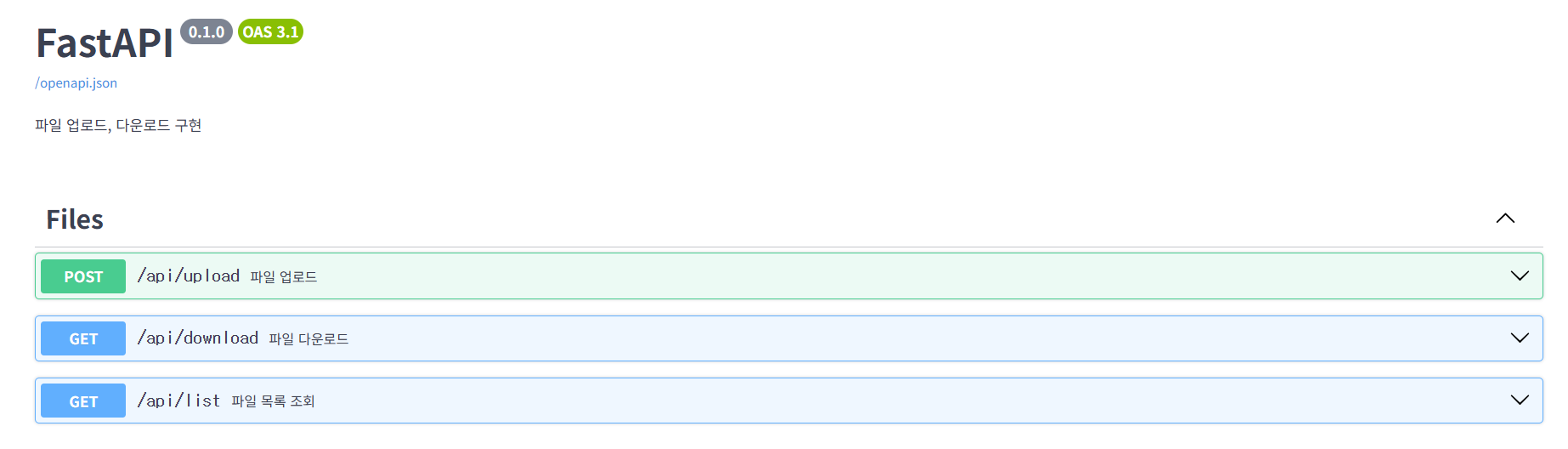
swagger 문서 확인
'WEB 개발' 카테고리의 다른 글
| [FastAPI] OAuth2.0 소셜 로그인 구현 (Naver, Kakao, Google) #1 (0) | 2025.09.03 |
|---|---|
| [OAuth] OAuth2.0 이란? (0) | 2025.09.02 |
| [Github Action] AWS에 자동 배포 하기 (0) | 2025.08.25 |
| [AWS] EC2 인스턴스 생성하기 (2) | 2025.08.25 |
| [FastAPI] 비밀번호 변경 구현하기(feat. Redis, SMTP) (2) | 2025.07.25 |